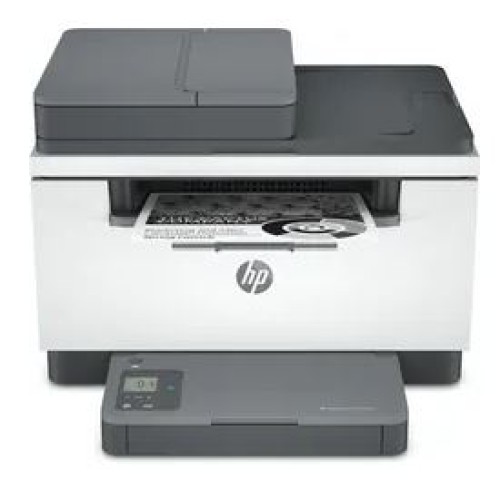
A high-productivity MFP with the fastest two-sided printing in its class,1 an automatic feeder, and the time-saving HP Smart app.2,3 With HP+, you'll get printing that gives you more.4 Count on a worry-free experience.
This is an HP+ printer. It requires an HP account, connection to the internet, and exclusive use of Original HP Toner cartridges for the life of the printer. More at: www.hp.com/plus-faq
HP+ printing made brilliantly simple
With HP+ get fewer printer interruptions with new connected cloud that automatically detects and fixes connectivity issues. 6
Never run out of toner with Instant Ink. Enroll to get toner, plus hassle-free delivery and recycling all starting at 1.99€ a month. 6 months trial included with HP+.4
More value added with HP+, get an additional year of HP warranty and advanced HP Smart app features.3
Investing in forests with every print.7
With HP+, your printer supports Forest First sustainable printing.7 For every page printed, we invest in the protection and management of healthy forests.7
Help save energy with a LaserJet that uses up to 20% less energy than previous model.
Stay productive from anywhere
Get started fast with easy setup that guides you, step by step. Simply download the HP Smart app, connect to Wi-Fi®, and share your printer across all your devices.2
Get high-quality scanning. Share to Dropbox, Google Drive, email, or the cloud – from virtually anywhere – with HP Smart app.6
Quickly access and print documents and images on your smartphone, from Dropbox and Google Drive, using HP Smart app.2
Work fast. Work smart.
Speed through multipage documents with the fastest in-class two-sided printing speed.1
You can fit this LaserJet almost anywhere – it’s that small and compact. Get projects done quickly with a printer that fits almost anywhere.
Easily handle large print jobs, and save time with automatic scanning and copying. Breeze through scan and copy tasks, using the automatic document feeder.
Increase productivity
Get better range and faster, more reliable connections using dual-band Wi-Fi™ with self-reset.
Seamless setup
Get started fast with simple setup that guides you through each step, with HP Smart app.
Amazing scanning, now on your smartphone
Get high-quality scanning, and share to Dropbox, Google Drive, email, or the cloud – from virtually anywhere.
Printing just got more productive
Quickly access and print documents and images on your smartphone, from Dropbox and Google Drive.
Small size. Big performance.
A LaserJet MFP so compact it can fit almost anywhere.
Fastest in-class two-sided printing speed
Speed through multipage documents with the fastest in-class two-sided printing speed.
Specifications
Functions
Print, copy, scan
Print speed black (ISO, A4)
Up to 29 ppm11([7] Measured using ISO/IEC 24734, excludes first set of test documents. For more information see http://www.hp.com/go/printerclaims. Exact speed varies depending on the system configuration, software application, driver, and document complexity.)3
Print speed duplex (A4)
Up to 18 ipm
First page out black (A4, ready)
As fast as 7 sec
Duty cycle (monthly, A4)
Up to 20,000 pages
Recommended monthly page volume
200 to 2,000(HP recommends that the number of printed pages per month be within the stated range for optimum device performance, based on factors including supplies replacement intervals and device life over an extended warranty period.)3
Number of users
1-5 Users
Print technology
Laser
Print quality black (best)
Up to 600 x 600 dpi
Processor speed
500 MHz
Print languages
PCLmS, URF, PWG
Display
1.6" Icon LCD
Print colors
No
Number of print cartridges
1 (black)
Automatic paper sensor
Yes
Mac compatible
Yes
Printer Management
HP Printer Assistant (UDC); HP Device Toolbox
Security management
Secure Boot, Secure Firmware Integrity, Runtime Code Integrity, password protected EWS, secure browsing via SSL/TLS 1.0, TLS 1.1, TLS 1.2; TLS 1.0/1.1 disabled by default; Update to OpenSSL version 1.1.1; Enable/disable Network ports; SNMPv1, SNMPv2, and SNMPv3, Community password change; Secure defaults, Encrypted data at rest, Active FW update, Admin password by default, Cipher & TLS selection; Account lockout; Secure Wi-Fi setup
Mobile printing capability
Apple AirPrint™; HP Smart App; Mopria™ Certified61([5] Wi-Fi Direct® footnote: Mobile device needs to be connected to Wi-Fi Direct® signal of a Wi-Fi Direct-supported AiO or printer prior to printing. Details at hp.com/go/mobileprinting. Wi-Fi Direct® is a registered trademark of Wi-Fi Alliance®.)3
Connectivity, standard
1 Hi-Speed USB 2.0; 1 Fast Ethernet 10/100Base-TX
Connectivity, optional
No
Minimum System Requirements
Microsoft® Windows® 10: 32/64-bit, 2 GB available hard disk space, Internet connection
Minimum System Requirements for Macintosh
Apple® macOS v10.14 Mojave, macOS v10.15 Catalina, macOS v11 Big Sur; 2 GB available hard disk space; Internet required
Compatible Operating Systems
Microsoft® Windows® 10: 32/64-bit, 2 GB available hard disk space, Internet connection, Microsoft® Internet Explorer. Apple® macOS v10.14 Mojave, macOS v10.15 Catalina, macOS v11 Big Sur; 2 GB available hard disk space; Internet required. Linux: for more information, see https://developers.hp.com/hp-linux-imaging-and-printing(Not supporting Windows® XP (64-bit) and Windows Vista® (64-bit), Windows 7, 8, 8.1. Full solution software available only for Windows 10 and newer; For Windows Server 2008 R2 64-bit, 2012 64-bit, 2012 R2 64-bit, 2016 64-bit only print driver is installed. Windows RT OS for Tablets (32/64-bit) uses a simplified HP print driver built into the RT OS; Linux systems use in-OS HPLIP software.)3
Compatible Network Operating Systems
Linux: for more information see http://developers.hp.com/hp-linux-imaging-and-printing
Memory
64 MB
Maximum Memory
64 MB
Memory Slots
No
Memory card compatibility
No
Internal Storage
No
Paper handling input, standard
150 sheet input tray
Input capacity
Up to 150 sheets
Maximum input capacity (sheets)
Up to 150 sheets
Paper handling output, standard
100 sheet output tray
Output capacity
Up to 100 sheets
Maximum output capacity (sheets)
Up to 100 sheets
Duplex printing
Automatic (standard)
Paper trays, standard
1
Paper trays, maximum
1
Maximum Input Capacity (envelopes)
Up to 10 envelopes
Media sizes supported
A4; A5; A6; B5 (JIS)
Media sizes, custom
101.6 x 152.4 to 216 x 356 mm
Media types
Paper (laser, plain, rough, vellum), Envelopes, Labels, Cardstock, Postcard
Media weight, supported
60 to 163 g/m²
Scanner type
Flatbed, ADF
Scan file format
JPEG, TIFF, PDF, BMP, PNG
Scan resolution, optical
Up to 600 dpi
Bit depth
24-bit
Scan size, maximum
216 x 297 mm
Scan size (ADF), maximum
216 x 356 mm
Automatic document feeder capacity
Standard, 40 sheets
Scan speed (normal, A4)
Up to 19 ppm (black and white), up to 10 ppm (colour)51
Scan input modes
Front-panel copy, HP Smart app, HP Scan SW, app through scan driver
Copy speed (black, normal quality, A4)
Up to 29 cpm
Copy resolution (black text)
Up to 600 x 600 dpi
Copy reduce / enlarge settings
25 to 200%
Copies, maximum
Up to 99 copies
Copier settings
Number of Copies; Lighter/Darker; Optimise; Paper; Multi-Page Copy; Draft Mode
Faxing
No
Power
220 to 240 VAC (+/- 10%), 60 Hz/50 Hz, 2.8 A
Power supply type
Built-in 110V or 200V Power Supply
Power consumption
453 watts (active printing), 3.3 watts (ready), 0.6 watts (sleep), 0.6 watts (Auto Off/Wake on LAN, enabled at shipment), 0.04 watts (Auto-off/Manual-on), 0.04 (Manual Off)(Power requirements are based on the country/region where the printer is sold. Do not convert operating voltages. This will damage the printer and void the product warranty. Power consumption values typically based on measurement of 115V device.)3
Typical electricity consumption (TEC) number
0.256 kWh/Week (Energy Star)
Energy star certified
No
Operating temperature range
15 to 32.5ºC
Recommended operating humidity range
30 to 70% RH
Minimum dimensions (W x D x H)
418.0 x 308.0 x 294.4 mm
Maximum dimensions (W x D x H)
418.0 x 467.6 x 452.8 mm
UPC number
(ABT) 194850889448; (B19) 194850889455
Package dimensions (W x D x H)
497 x 379 x 409 mm
Package weight
12.45 kg
Quantity per pallet
30
Pallet dimensions (W x D x H)
1200 x 1000 x 2196 mm
Pallet weight
393.95 kg
Country of origin
Made in Vietnam
What's in the box
HP LaserJet MFP M234sdne Printer
HP Black LaserJet Toner Cartridge (~700 pages)
Reference Guide
Setup Poster
Warranty Guide & Flyer in some countries
Power cord
Cable included
No, please purchase USB cable separately
Replacement cartridges
HP 135A Original Black LaserJet Toner Cartridge, W1350A (1100); HP 135X Original Black LaserJet Toner Cartridge, W1350X (2400)([4] Declared yields based on ISO/IEC 19752 and continuous printing. Actual yields vary considerably based on images printed and other factors. For details see http://www.hp.com/go/toneryield)3
Software included
No CD inbox; Downloadable Software from http://www.hp.com or http://www.123.hp.com
Manufacturer Warranty
Two-year limited warranty
Overview
1
Compared to in-class monochrome laser printers and MFPs less than 220€ for single function or less than 320€ for multifunction, all with a published maximum monthly duty cycle of 20,000 or lower. Buyers Lab September 2020 study commissioned by HP, based on a research survey OEM published specifications publicly available information as of 09/01/2020. Market share as reported by IDC Quarterly Hardcopy Peripherals Tracker - Final Historical 2020Q2 for North America and EMEA. For details: http://www.keypointintelligence.com/HPFastestDuplex.
2
Requires the HP Smart app download. For details on local printing requirements see http://www.hp.com/go/mobileprinting. Certain features/software are available in English language only, and differ between desktop and mobile applications. Instant Ink subscription may be required. Instant Ink not available in all countries. See details at http://www.hptonerservice.com. Internet access required and must be purchased separately. HP account required for full functionality. List of supported operating systems available in app stores. Fax capabilities are for sending a fax only, and may require additional purchase. For more information, see http://www.hpsmart.com/mobile-fax.
3
Based on internal HP testing. Average timing estimate based on: 1) downloaded HP Smart app on mobile device, 2) setting up Shortcut, 3) scanning jobs which have more than 2-3 tasks associated with them (scan to email, save and rename, store to cloud, etc.). Average timing savings comparison based on using printer and desktop scan software to complete similar scanning tasks. Requires the HP Smart app download and supported HP printer. For details on local printing requirements see http://hp.com/go/mobileprinting. Certain features/software are available in English language only.
4
Instant Ink sign up required. Instant Ink not available in all countries. Subject to monthly page limit of plan selected. Must complete Instant Ink signup within 7 days of setting up the printer with the HP-recommended setup process as indicated in the instructions that came with your printer. Unless service is cancelled within the promotional period online at http://www.hpinstantink.com, a monthly service fee, based on the plan chosen, plus tax and overage fees will be charged to your credit/debit card. Customer will be charged for any overage fees and applicable taxes at the end of each month in the promotional period. Use of in-box ink cartridge is included in period of offer. One offer redeemable per printer. Free months offer with Instant Ink subject to change after 10.31.2021. Offer cannot be redeemed for cash. Setup Offer may be combined with other offers; see terms and conditions of the other offer for more details. Requires a valid credit/debit card, an email address, and Internet connection to printer. See additional offer information available during online signup process. For service details, see http://www.hpinstantink.com.
6
Improved printer connectivity utilizing Smart Driver and Print/Scan Doctor technology in the HP+ system, versus HP consumer printers without HP+.
7
See additional details at https://www8.hp.com/us/en/hp-information/sustainable-impact. Investment includes NGO partnerships targeted to protect forests, improve responsible forest management and help develop Science Based Targets (SBT) for responsible management of forests.
Specifications
HP PRINTER ALL IN ONE LASER MONOCHROME BUSINESS M234SDW A4, PRINT, SCAN, COPY, 29PPM, 600 X 600 DPI, 64MB, DC:20K, 1-5 USERS, DUPLEX, ADF, USB, LAN, WIFI, 1YW, WHITE + BASALT
- Brand: Hp
- Product Code: 6GX01F
- Availability: In Stock
-
€163.03
- Ex Tax: €137.00